Creative Drive CRO Contact Us

Top / Feature / A/B and Multivariate

Improve

A/B and Multivariate

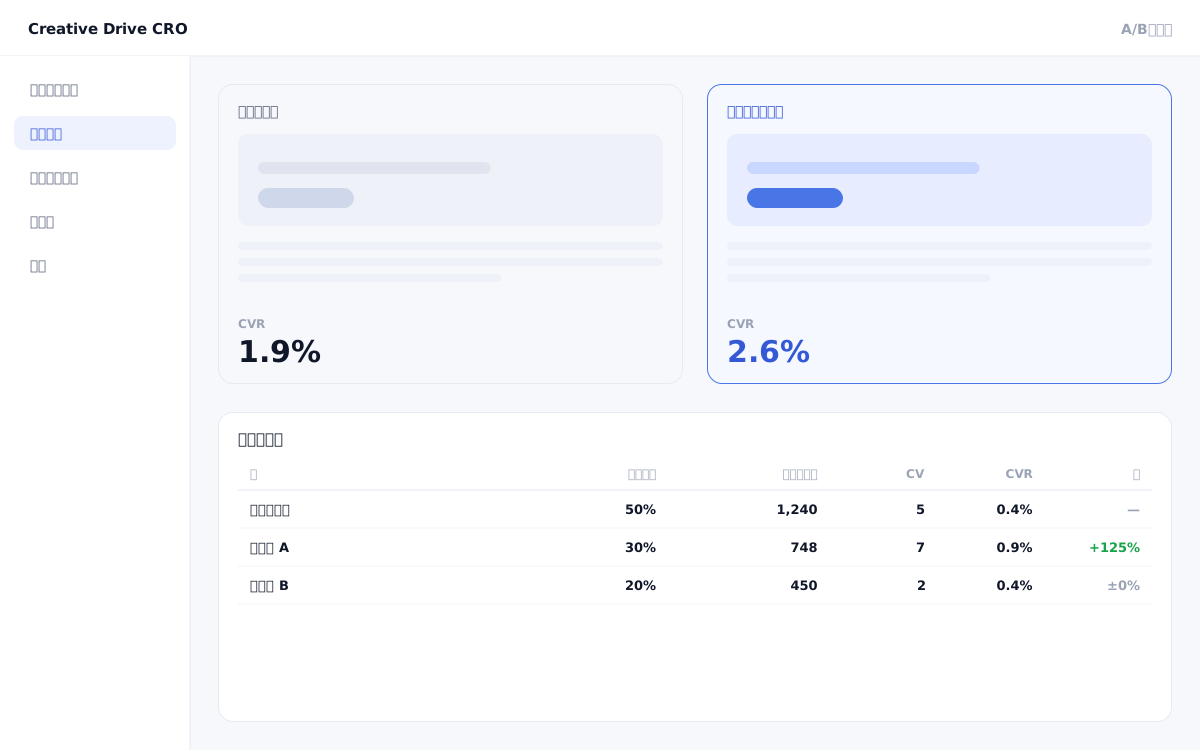
You can have multiple options for a single initiative.The delivery ratio is set per variant, and the same variant will continue to be shown to the same person.

A/B and Multivariate Screen

"I want to run A/B tests, but I can't implement them without asking an engineer," "Once a test starts, it touches the code and conflicts with releases," "Each test takes so long that we can only validate one or two hypotheses per month" — many marketing teams find their A/B testing has become little more than a formality for exactly these reasons.The Creative Drive CRO A/B test and multivariate test feature works by overlaying differences onto existing pages, allowing you to run any number of tests in parallel without engineering resources.

We solve these challenges

What you can do

How it works

Creative Drive CRO's A/B testing operates using a "diff overlay on the original page" method, so there is no need to prepare a separate URL or page for testing.Identifies visitors using first-party IDs and always displays the same variant to the same visitor (consistency guaranteed).Multiple variants are identified without relying on URLs or cookies, so the same variant will continue to be served even if cookies are deleted.Integrates with the AI improvement suggestion feature to automatically detect A/B test conclusions and send notifications such as "No significant difference yet," "This variant is leading," and "Concluded (Variant B wins with +12% CV)."The delivery ratio is equal by default, but can also be changed manually.

Use it in situations like this

Test 3 landing page catchphrases simultaneously

Compare three appeals side by side in the first-view H1: "Cost Reduction," "Revenue Growth," and "Time Savings."You can also check performance by segment (industry/device) on a single screen, allowing you to quickly gain insights such as "cost-effectiveness messaging works well for B2B audiences."

A/B test form CTA text

Distribute "Free Consultation," "Request Materials," and "Try It First" evenly.The same variant is always shown to the same visitor, eliminating the issue of inconsistent content across visits that could negatively impact conversions, and enabling stable comparisons.

Run separate tests in parallel for search ads and retargeting

By combining with traffic source conditions, you can independently run an A/B test for first-time visitors from branded searches and an A/B test for returning visitors via retargeting ads.Prevents the issue of mixed effect visibility that occurs when all visitors are treated as the same population.

Determine the optimal plan separately for smartphone and PC

Combine with device conditions to set up separate A/B tests for PC and smartphone.Even if side-by-side plan cards work best on desktop, you can individually test cases where a single vertical column yields higher CV on mobile.

Getting started

01

Place the measurement tag on the page you want to test

Add one line of measurement tag to the target page of the A/B test.If it is already installed, this step is not required.CV settings will also be completed in advance.

02

Check the original page (control)

In the visual editor of the admin panel, check the elements to be tested (headings, CTAs, images, sections).This will become the "original plan (control)."

03

Create one or more variants (test proposals)

Set the differences for the elements you want to change.For A/B, create 1 variant; for multivariate, create 2 or more variants.The ratio is set to equal by default but can be changed manually.

04

Start delivery and accumulate data

After delivery starts, visitors will consistently see either the original version or the test version.You can also check performance by segment (device, traffic source, and number of visits) on the same screen.

05

Use AI judgment to confirm the winning result and align with the winning variant

AI improvement suggestions will detect test conclusions and send notifications.Clicking "Apply winning variant" once will end the test and apply the winning variant to all visitors.

FAQ

If the same person visits multiple times during an A/B test, will a different variant be shown each time?
No.The same idea will continue to be displayed.With random delivery, content changes with each visit. However, Creative Drive CRO identifies returning visitors and consistently shows them the same variant, preventing the experience of "content being different today than it was yesterday."
How many variants can be tested simultaneously?
There is no limit on the number of cases.The delivery ratio for multiple variations will be automatically adjusted to be equal.You can also manually change the ratio if you want to focus delivery on a specific option.
When and who determines the win/loss of a test?
The AI improvement proposal feature detects convergence by reviewing actual measurement data and sends notifications.To communicate status in three stages — "No difference yet," "This variant is leading," and "Concluded" — you won't miss the right moment to make a decision even without checking the dashboard every day.
How do I "officially adopt" the winning variant?
You can execute the "align with winning variant" operation in one click.This action will end the A/B test and display the winning variant to all visitors.You don't need to modify the original code.
What is the difference between multivariate testing and A/B testing?
An A/B test compares 2 or more variations with one element changed.Multivariate testing simultaneously compares multiple patterns combining several elements.With Creative Drive CRO, you can configure everything on the same screen by creating multiple variations through real page editing.

Related features

WEB customer engagement targetingChange by entry page, traffic source, visit count, region, and device.Edit Live PageOnly the differences will be applied on top of the existing site.AI improvement suggestionsJust approve it and the changes will be applied.The wording will also be displayed.

You can try it with your current site as-is

You can start by placing a single line of tag.

Contact Us