Creative Drive CRO Contact Us

Top / Feature / Web customer service segmentation

Improve

WEB customer engagement targeting

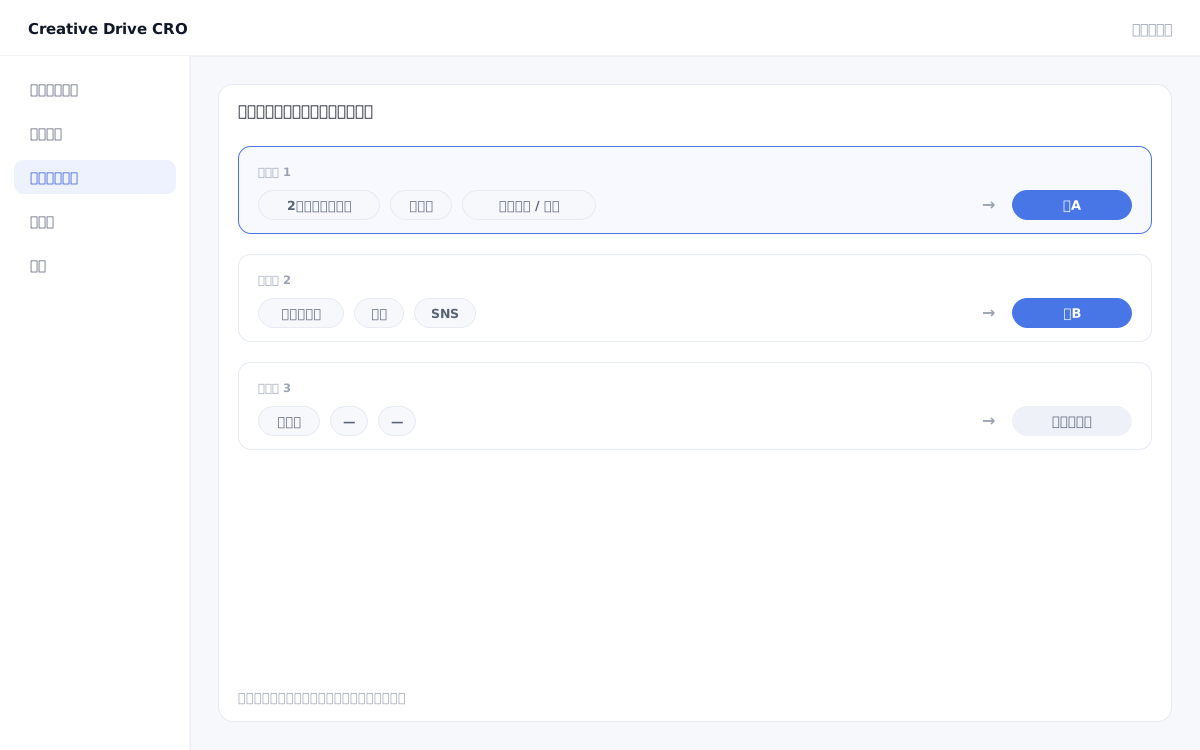
Keep the same URL while changing the content based on the visitor.Conditions are checked from top to bottom; if none apply, delivery returns to normal.

Web customer interaction segmentation screen

Showing the same single LP and site to all visitors means delivering identical information to people who would each benefit from different content.Visitors coming from search ads need a service explanation, while returning visitors coming via retargeting ads who have already heard your pitch at a trade show respond better to pricing and comparison information.Creative Drive CRO's content personalization feature delivers optimized content to each visitor without changing the URL, enhancing the accuracy of LPO and CRO improvements.

We solve these challenges

What you can do

How it works

The Creative Drive CRO segmentation feature evaluates conditions on the browser side.When a visitor opens a page, the tracking tag evaluates more than 10 conditions (traffic source, visit count, region, device, URL parameters, AI referral, entry page, etc.) and displays the content variant linked to the first matching condition.Conditions are evaluated from top to bottom, and visitors who do not match any condition will be shown the default standard page.You can set up complex conditions combining AND/OR/Exclude, and verify actual behavior using the "Condition Test feature" before applying to production.This allows marketers to directly design and execute personalized messaging variations without requesting assistance from engineers.

Use it in situations like this

Switch appeals by ad traffic source

For visitors from branded search ads, highlight detailed feature explanations; for return visitors from retargeting ads, bring pricing and comparison tables to the forefront.Showing content that closely matches visitors' pain points first increases page relevance and leads to improved conversion rates.

Display dedicated content to visitors from AI search (ChatGPT · Perplexity · Gemini)

Detect visitors arriving from AI referrals such as ChatGPT, Perplexity, and Gemini, and prioritize displaying AI use cases and detailed materials.AI-driven traffic-based appeal switching is a capability that remains rare among domestic LPO tools.

Evolve page content based on number of visits

For first-time visitors, highlight the service overview and problem statement; for 2nd–3rd time return visitors, highlight "Why we're chosen" and "How we differ from competitors."Communication tailored to the purchasing behavior of visitors whose consideration deepens with each return visit is now possible.

Dynamically switch case studies and pricing by URL parameter and region

Prioritize displaying case studies from the Greater Tokyo area for visitors from Tokyo, and Kansai case studies for visitors from the Kansai region.If the URL contains industry information, relevant case studies and use cases for that industry can be automatically surfaced in the first view.

Getting started

01

Install measurement tag

Simply paste a one-line tag into `<head>` to complete the setup for the target page.Installation via GTM is also possible, but we recommend placing the code directly in the head tag for faster page load speed.

02

Create personalization conditions

In the admin panel, configure "which visitors" to show "what content" to.You can combine 10+ condition types — including traffic source, visit count, region, device, URL parameters, and more — using AND/OR/exclusion logic.

03

Set content variants

Set "Show this LP to visitors matching these conditions," "Hide this block," and "Replace this heading" in combination with real page editing.

04

Verify operation with condition test

In the admin panel, use the "Condition Test" feature to enter test visitor attributes and verify which conditions they match.You can verify that the behavior is as expected before releasing to production.

05

Combine with Delivery Start / A/B

When delivery starts, content will automatically switch for visitors who match the conditions you have set.By running A/B tests within specific segments, you can simultaneously compare the effectiveness of different messaging delivered to each audience.

FAQ

Do engineers need to be involved in configuring content targeting settings?
Not needed.Simply set the conditions and display content in the admin panel, and they will be automatically applied to pages where the tag is placed.No HTML or JavaScript modifications are required.
If there are multiple conditions, in what order are they evaluated?
Conditions are evaluated from top to bottom, and the settings of the first matching condition are applied.Visitors who do not match any condition will see the normal page (default).
Are there any limits on the number of conditions and patterns for content delivery?
There are no restrictions.You can also freely configure combinations of AND/OR/Exclude.You can also use the "Condition Test" feature before delivery to verify which conditions actually apply before going live.
Can you run A/B tests while applying content targeting?
Yes.You can further run A/B tests within the segment filtered by content targeting.You can configure settings such as comparing "Appeal A vs Appeal B" within the condition "For repeat visitors (2nd visit or later)."

Related features

Edit Live PageOnly the differences will be applied on top of the existing site.AI improvement suggestionsJust approve it and the changes will be applied.The wording will also be displayed.A/B and MultivariateView wins and losses for each proposal, before and after editing.

You can try it with your current site as-is

You can start by placing a single line of tag.

Contact Us