Creative Drive CRO Contact Us

Top / Feature / 3 LP Shapes

Create

3 LP formats

An LP isn't just about reading top to bottom.You can choose the format that suits your delivery method.You can also change the content displayed based on the answer.

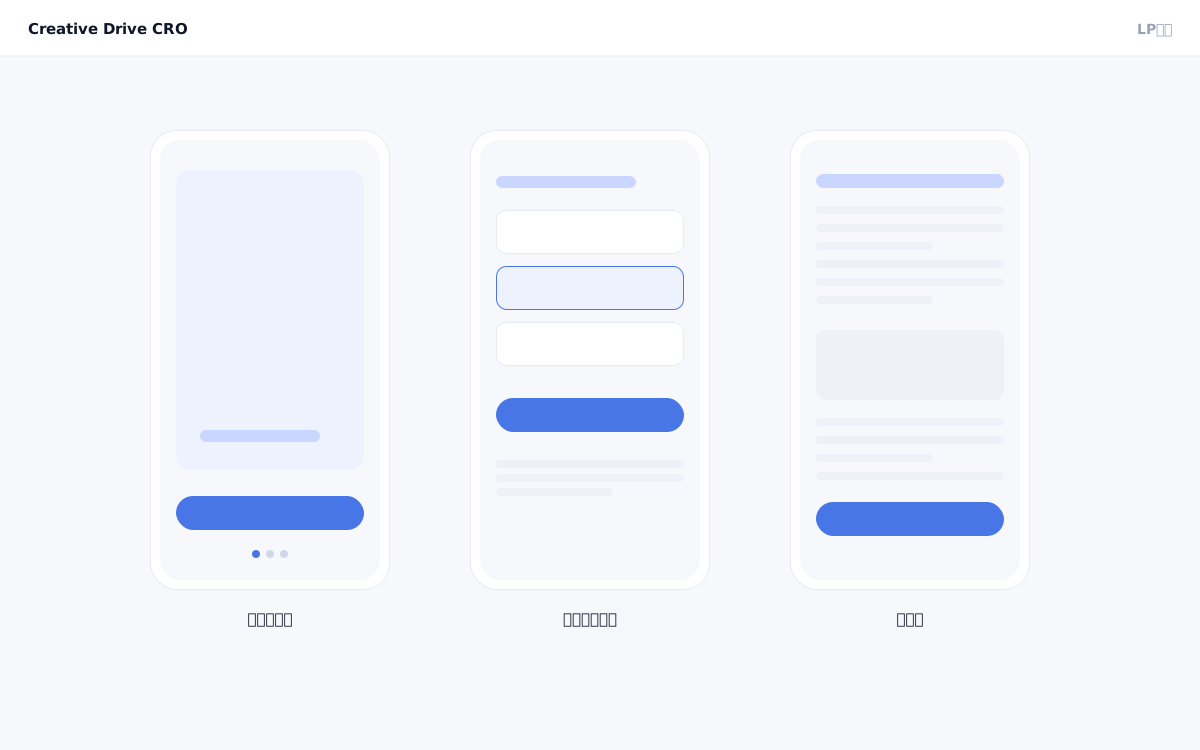
Screen in the form of 3 LPs

Operating with only a single-page format that leads users to "read vertically" through a landing page forces the same experience on audiences who require different approaches — such as visitors coming from smartphone ads, visitors in the awareness stage, or users from specific industries.In addition to the vertical scroll type, Creative Drive CRO offers three LP formats: swipe type, survey type, and article type.By selecting the optimal format to match the channel and campaign objective, you can improve the visitor experience and reduce bounce rates.

We solve these challenges

What you can do

How it works

Creative Drive CRO supports four LP formats — vertical scroll, swipe, survey, and article — all built on a unified production and delivery platform.The swipe type consists of a layout optimized for horizontal page transitions and touch operations.The survey type combines question blocks and branching logic, enabling conditional display and settings based on responses.The article type measures body text completion rate and scroll depth, while allowing you to insert inline CTA blocks at any position.All formats can be treated equally as targets for A/B testing and segment-based delivery.

Use it in situations like this

Use swipe-type LP as the landing page for smartphone video ads

Swipe-type landing pages, where users swipe horizontally to proceed, work well with traffic coming from TikTok and Instagram Reels.You can reduce drop-offs with an interactive experience that carries over the world of your video ad.

Distribute different content by issue on a hearing-type survey LP

By having users answer the question "What is your challenge?", you can change the content and messaging displayed based on their responses.It is well-suited for use in B2B and high-value services.

Boost conversion rates with article-style LPs that blend SEO articles and landing pages

Article-style LPs that guide readers to a CTA while engaging them as a read are well-suited for visitors arriving from SEO or those in the comparison and consideration stage.A design that combines content marketing with direct CV pathways is possible.

Getting started

01

Select a format when creating a new LP

On the "Create New LP" screen, select a format from vertical scroll, swipe, survey, or article types.The initial block configuration varies depending on the format.

02

Choose an industry template to get started

After selecting a format, choosing an industry template will apply a layout suited to that industry.Start with a blank canvas when building from scratch.

03

Assemble blocks and enter content

Complete pages by combining format-specific blocks (swipe screens, questions, branching, etc.) with common blocks (headings, body text, CTA).

04

Connect to delivery segmentation and A/B testing

Register the completed LP in distribution rules or set it as a target for A/B testing.By A/B comparing LPs with different formats, you can test the optimal way to reach your audience.

FAQ

Can all three formats be created in the same admin screen?
Yes.All formats can be created and edited in the same Creative Drive CRO management screen.The format is selected when creating a new LP.
Can I change the content displayed based on answers in a survey-type LP?
Yes.You can connect the answer content as a condition to link to sections displayed afterward and branching rules.By combining with the content delivery feature, you can switch appeals for each response.
Can the format be changed later?
Format changes after creation are not supported.We recommend creating separate LPs for each format and using them selectively through A/B testing or conditional delivery.

Related features

Create LP with AI conversationJust tell us your product and target audience, and we'll create it.No-code block editingRearrange headings, pricing tables, FAQs, and more.Template and Industry PresetsYou can start with appeals and scores by industry.

You can try it with your current site as-is

You can start by placing a single line of tag.

Contact Us