Creative Drive CRO Contact Us

Top / Feature / Attribution Analysis

Analysis

Attribution Analysis

You can switch and view which traffic source the results are attributed to.You can avoid a situation where only branded search is evaluated.

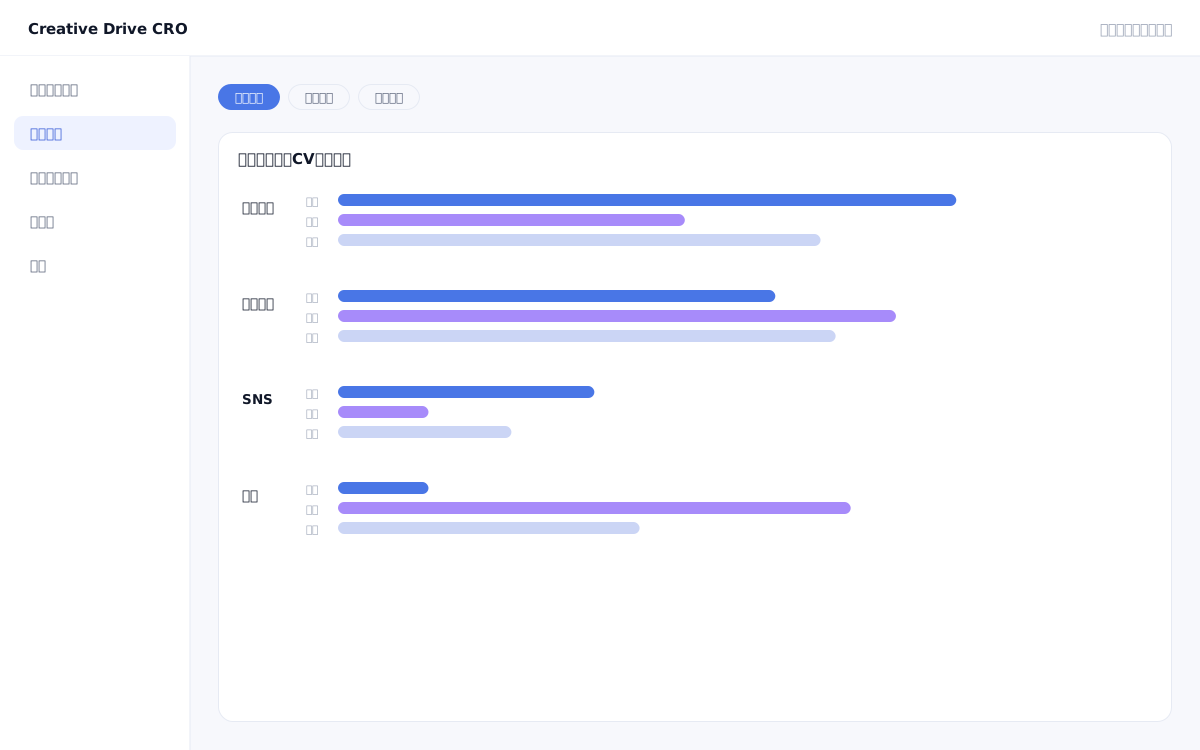
Attribution Analysis Screen

In many cases, only the traffic source immediately before the CV (last touch) is credited as a conversion.With this approach, the structure tends to become one where "branded search takes credit for conversions," causing SEO and display advertising that function in the awareness and consideration phases to be undervalued.Creative Drive CRO's attribution analysis lets you switch between three models—first touch, last touch, and linear (equal distribution)—to evaluate channel contribution from different perspectives using the same conversion data.You can understand which channels are acting as "entry points" and which are serving as the "final push," and use this information to make budget allocation decisions.

We solve these challenges

What you can do

How it works

The attribution analysis of Creative Drive CRO uses session data collected by measurement tags to record the contact history (touchpoints) leading up to conversions.You can switch between three models on screen to re-evaluate the same data: First Touch (100% credit to the first source), Last Touch (100% credit to the most recent source), and Linear (equal credit distributed across each touchpoint).The lookback window is set to a standard 30 days, and contact history within that period will be the subject of analysis.A session boundary is defined by 30 minutes of inactivity or a change in external referral source.

Use it in situations like this

Re-evaluate the contribution of SEO and display advertising with the first-touch attribution model

In the last-touch model, branded search and retargeting ads tend to dominate conversions, but switching to a first-touch model reveals the contribution of awareness channels (blogs, display, and social media).It can be used as a basis for appropriately allocating budgets to upper-funnel initiatives.

Fairly compare CPA across each channel with equal distribution

This model evenly distributes CV results across multiple channels based on the number of touchpoints, allowing you to compare the CPA of each channel.It can be used as a basis for deciding "which channels to increase investment in" and "which channels to scale back."

Capture customers with long consideration periods using a 30-day lookback window

For B2B products and high-ticket items, it often takes 1 to 2 weeks from the first touchpoint to conversion.By setting a 30-day lookback window, you can accurately track the contact history of customers who converted after a long consideration period.

Getting started

01

Install the measurement tag on all pages

Install measurement tags on all pages.Touchpoint recording only applies to pages where the tag is installed.By placing it on all of your landing pages, main site, and blog, you can record contact history to the fullest extent.

02

Set up conversions

Set CVs such as inquiry form submissions, document downloads, and arrivals at specific URLs.If no CV is set, contact history will not be used in analysis.

03

Open Attribution Report

Open the Attribution Report from the Reports menu.The default is displayed with the last-touch model.

04

Switch models to compare channel evaluations

Switch to the first-touch and linear attribution models to check how the CV contribution count and CPA change for each channel.Channels with a large difference from the last-touch model are those functioning as the "final push" or "entry point."

FAQ

Will changing the attribution model affect past data as well?
Yes.Switching models recalculates contributions from a different perspective for the same CV data.The original data will not be changed.
Can the measurement window (lookback window) be changed?
The default is set to 30 days.You can change this to match the purchase consideration period of your product.
How is this different from GA4 attribution?
Creative Drive CRO uses first-party IDs, so it is not affected by third-party cookie restrictions.Contact history across different domains can also be tracked as the same individual, enabling accurate identification of cross-domain CV paths.

Related features

Real-time measurement infrastructureCounts unique values by deduplicating with your own ID.Traffic, Search & Advertising ReportsTrack everything from traffic source to conversion in a single line.Page GroupingGroup URLs by area.It is 2 levels deep.

You can try it with your current site as-is

You can start by placing a single line of tag.

Contact Us