Creative Drive CRO Contact Us

Top / Feature / Acquisition, Search & Advertising Report

Analysis

Traffic, Search & Advertising Reports

You can view sessions and conversions by channel, impressions and rankings by search term, and ad costs and performance, all linked by the same ID.

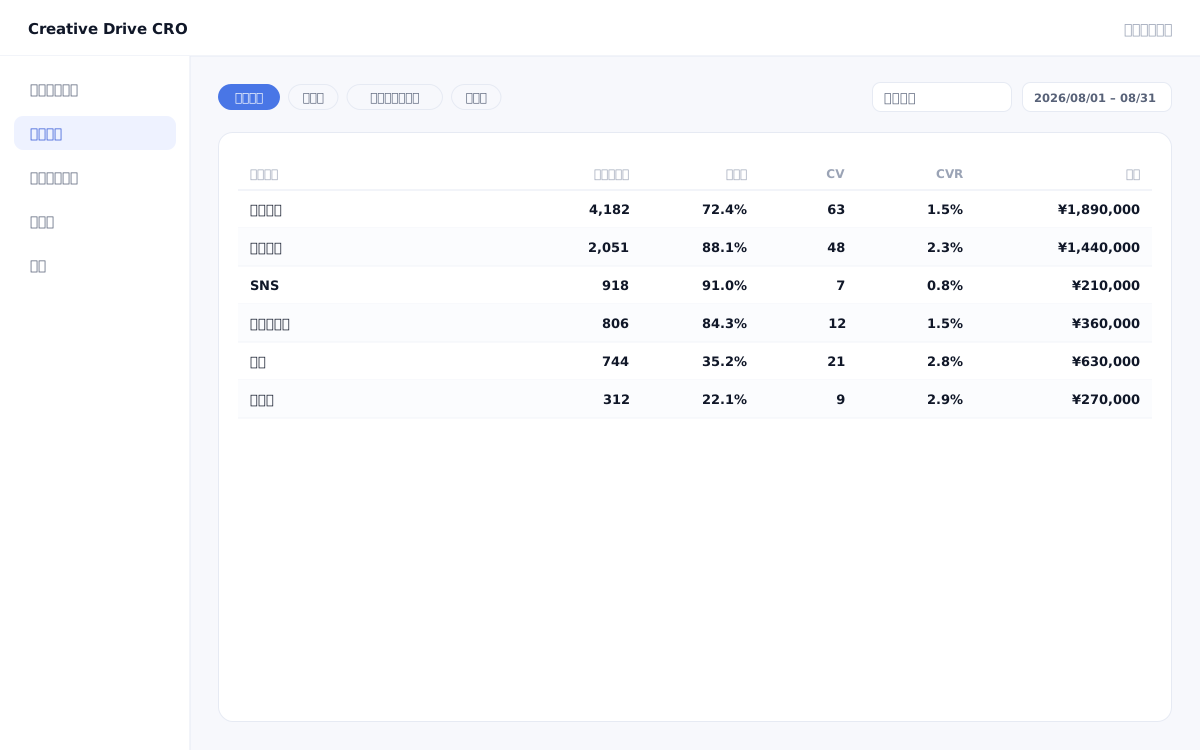
Acquisition, Search & Advertising Reports screen

Viewing GA4, Google Search Console, and the ad management screen separately makes it impossible to get a complete picture of "which channels led to conversions through which pages."Data definitions differ across tools, and numbers often don't match.The Creative Drive CRO reporting feature uses data collected by first-party measurement tags to provide three unified reports — Acquisition (by channel), Search (search terms and rankings), and Advertising (costs and results) — all linked by a unified ID.You can track the entire flow from traffic acquisition to conversions on a single screen, without switching between multiple tools.

We solve these challenges

What you can do

How it works

The Creative Drive CRO reporting feature is based on session, CV, and traffic source data collected by first-party measurement tags, and displays data from Google Search Console (search) and Google Ads/Meta Ads (ad spend) linked by a unified ID.Channels are automatically categorized into organic search, paid search, social ads, direct, referral, and more, and can be combined with page grouping to aggregate data by section.Report data is updated in real time and can be filtered by date range, channel, and page group.

Use it in situations like this

Complete monthly reports on a single screen

View sessions, conversions, CVR, and CPA by channel in a list.By combining with page grouping, you can compare the customer acquisition effectiveness for each segment, such as "via blog" or "via pages under /service".CSV and PDF export makes sharing with managers and agencies easy.

Analyze CV impact by search term

By linking Google Search Console data with measurement tag data, you can view "which search terms are being displayed," "which are being clicked," and "whether they are actually leading to conversions" all on the same screen.It can be used to prioritize SEO measures.

Check CPA and ROAS by ad creative

Display costs and results linked by ad creative unit and campaign unit.You can verify the discrepancy between ad platform reports and actual CV counts using first-party data.

Getting started

01

Set up a measurement tag and configure CV

Install measurement tags on all pages and configure conversions such as reaching a contact form or a specific URL as CV.This will be the foundation of all reports.

02

Connect Google Search Console

Authenticate and connect your Search Console property.Search terms, impressions, and click counts will be displayed linked to conversion numbers.

03

Link an ad account

Authenticate and connect your Google Ads and Meta Ads accounts.You will be able to check advertising costs and CV numbers on the same screen.

04

Set page grouping

Group pages by URL pattern (e.g., /blog/*, /service/*).You can check the traffic acquisition effect for each page group in the comparison report.

05

Share reports in CSV or PDF

Use the CSV/PDF export feature to share reports at the time of monthly reporting or campaign reviews.

FAQ

Can it be used simultaneously with GA4?
Yes.The Creative Drive CRO measurement tag and GA4 tag do not interfere with each other.You can also run it in parallel for comparison with GA4 data.
Is the search report only for Google?
Currently, integration with Google Search Console is supported.You can check the relationship between impressions, clicks, rankings, and CV count for each search query.
Can I export reports in CSV or PDF?
Yes.All reports can be exported in CSV and PDF formats.It can be used for sharing monthly reports and reporting to agencies.
What media does the advertising report support?
Supports Google Ads, Meta (Facebook/Instagram), and Yahoo! Ads.You can link costs and results at the campaign, ad group, and creative level.

Related features

Real-time measurement infrastructureCounts unique values by deduplicating with your own ID.Attribution AnalysisSwitches between first touch, last touch, and even distribution.Page GroupingGroup URLs by area.It is 2 levels deep.

You can try it with your current site as-is

You can start by placing a single line of tag.

Contact Us