Creative Drive CRO Contact Us

Top / Feature / Real-time measurement infrastructure

Analysis

Real-time measurement infrastructure

Counts visitors using your own issued IDs.Because the same person is counted as one across different domains and pages, you can compare performance across channels.

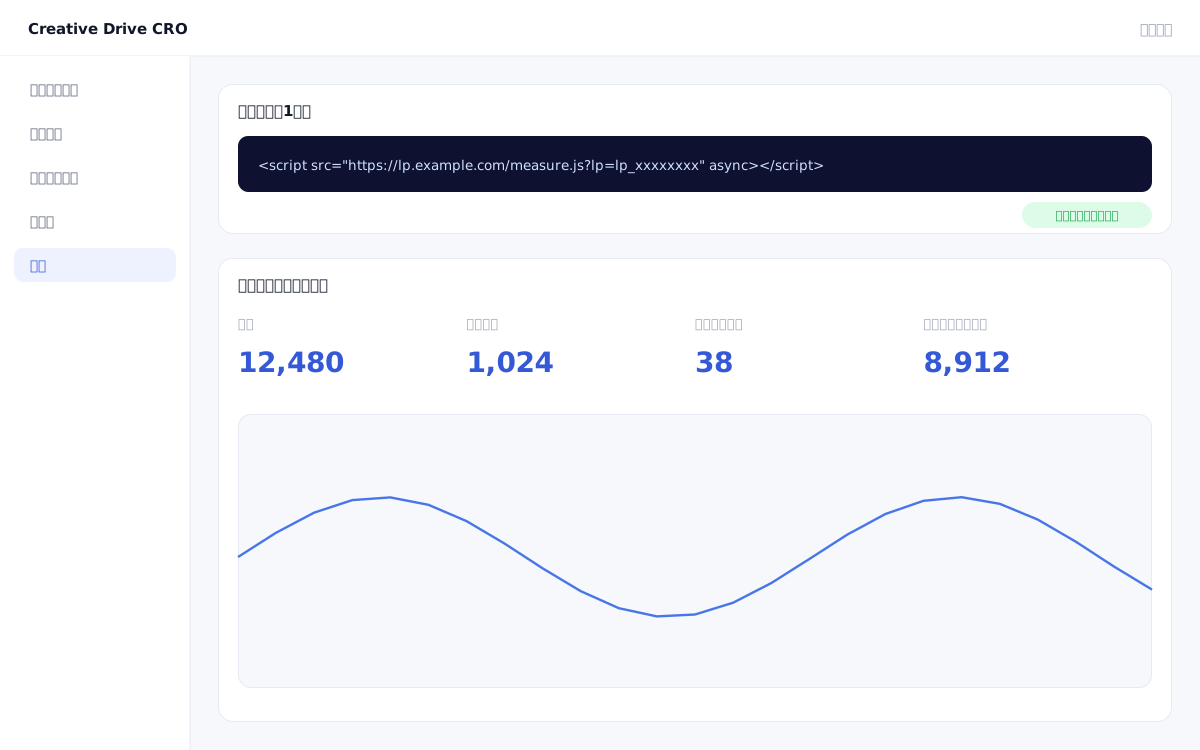
Real-time measurement dashboard screen

In measurement environments that combine Google Analytics (GA4) and ad tags, there are an increasing number of cases where the counted figures fall short of actual results, due to factors such as third-party cookie restrictions, lack of cross-browser identity resolution, and measurement fragmentation across different domains.Creative Drive CRO's first-party measurement uses a proprietary issued ID, enabling continuous measurement even in cookie-restricted environments and identifying visitors across different domains and pages as the same individual.

We solve these challenges

What you can do

How it works

Creative Drive CRO's measurement infrastructure uses first-party IDs without relying on third-party cookies.When a page with the tag installed is accessed, a unique ID is issued to the visitor using a combination of the browser's localStorage and first-party cookies.This unique ID is used for continuous tracking within the same domain, and across different domains, the ID is passed via URL parameters to continue measuring the same visitor consistently.Automatically measures views, clicks, scrolls, and time on page, and splits sessions after 30 minutes of inactivity or browser switching.CV firing, traffic sources, and UTM parameters are all captured directly by the first-party tag, making measurement resistant to ad blockers and enabling continuous tracking even in private browsing mode on ITP-compliant browsers.

Use it in situations like this

Track CV paths across multiple LPs and the main site with a single line

Even when crossing different domains such as lp.example.com (LP) → www.example.com (main site) → form.example.com (form), tracking continues to measure them as the same visitor.You can accurately track which channel and through which pages led to a conversion.

Calculate CPA and ROAS by ad channel using first-party data

Based on referral source information directly captured by the measurement tag, CV count, CPA, and ROAS are calculated by channel.Because it does not rely on self-reported data from advertising platforms, cross-channel comparisons become more reliable.

Run in parallel with GA4 to ensure measurement reliability

The Creative Drive CRO measurement tag and GA4 tag do not interfere with each other.By comparing with GA4 data, you can visualize the "percentage of actual visitors that GA4 fails to capture" and use it to evaluate the reliability of your reports.

Getting started

01

Place the measurement tag at the top of the head

Add a single measurement tag line to the very top of the `<head>` section on every page of your site.Placing it at the very top of the head prevents missing page view measurements.While installation via GTM is also possible, please consider the risk of missing the initial display.

02

Verify tag behavior

Verify that the tag is working correctly using the "Tag Check" feature in the admin panel.Enter the URL of the installation page to instantly check whether the measurement tag has been detected.

03

Set up conversions

Set up CV settings for actions you want to measure as conversions, such as inquiry form submissions, document downloads, and visits to specific URLs.By setting the amount per item, CPA calculation will also be automated.

04

Set page grouping

Pages are grouped into two hierarchical levels, "Major Category" and "Minor Category," by URL pattern.By grouping with patterns such as "/blog/*" and "/service/*", you can view aggregated values for all articles and all service pages in a list.

05

Link reports with content targeting

Once measurement data has accumulated, channel reports and page reports will be generated automatically.Since content personalization and A/B test results are measured on the same measurement platform, you can centrally manage the outcomes of your initiatives.

FAQ

Can it be used simultaneously with GA4?
Yes.Placing Creative Drive CRO measurement tags and GA4 tags on the same page will not cause interference.You can also run them in parallel to compare data.
Do I need an engineer to install the tag?
Just add one line to `<head>`.Installation via GTM is also possible, however, since delayed GTM loading may cause the initial page view to be missed, we recommend writing the code directly in the head tag.
Is this a measurement method that does not use cookies?
Uses first-party ID, leveraging browser localStorage and first-party cookies.Because it does not rely on third-party cookies, measurement can continue even in ITP-compliant browsers or incognito mode.
Is personal information (name and email) collected by the measurement tag?
The measurement tag itself does not collect personally identifiable information.To link leads with visit history after form submission, a dedicated integration configuration is required.The system is designed to not record the contents of input fields.

Related features

Traffic, Search & Advertising ReportsTrack everything from traffic source to conversion in a single line.Attribution AnalysisSwitches between first touch, last touch, and even distribution.Page GroupingGroup URLs by area.It is 2 levels deep.

You can try it with your current site as-is

You can start by placing a single line of tag.

Contact Us