Creative Drive CRO Contact Us

Top / Feature / MCP compatible (AI-operated)

Cross-cutting

MCP compatible (AI-operated)

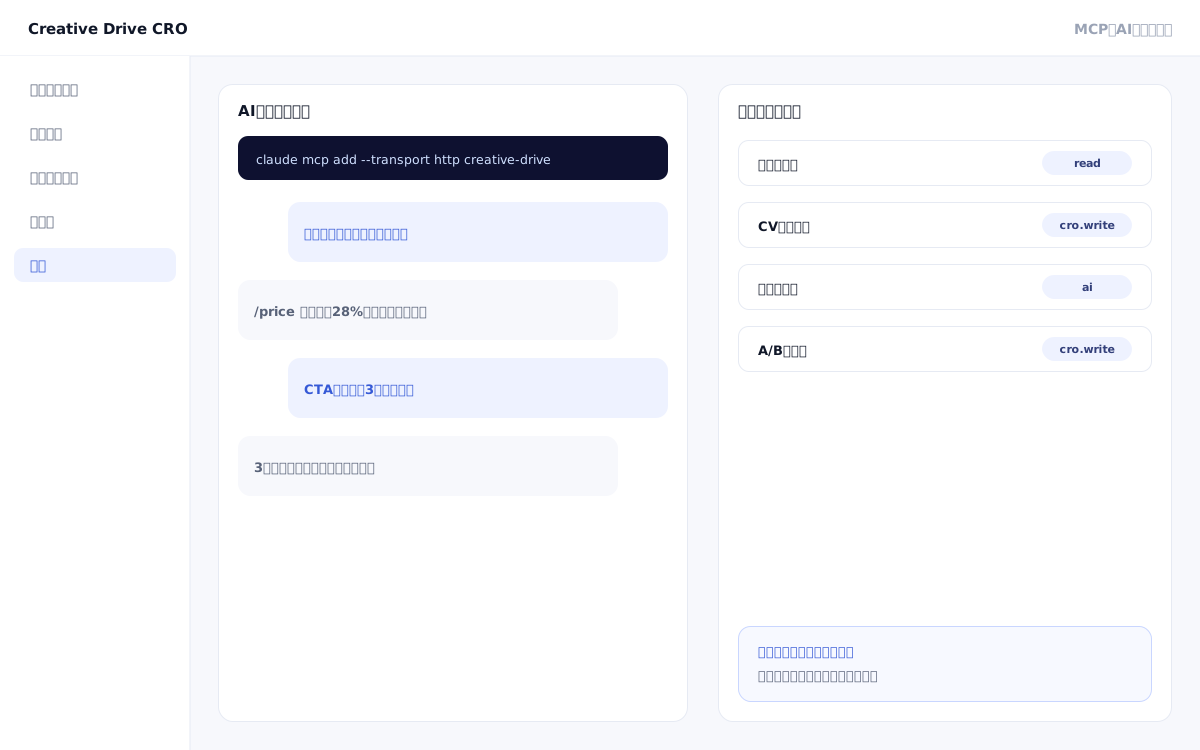
Just by talking to the AI assistant you use every day, you can delegate everything from reading numbers and changing settings to creating improvement proposals and applying them.Once you register your URL and key, you can make requests in plain language from then on.

MCP-compatible (AI-operated) screen

What you can do

You can ask like this

You don't need to remember the name of the operation.Just talk to it like this.AI will select which operation to use.

Right after connecting

Register the URL and key only once for the first time.Just start talking.

Connected to Creative Drive? What can you do?
Returns the connected account and the operations permitted with this key.whoami
List my projects
Display the list of projects.You can also see whether it's CRO or LPO, as well as the measurement tag ID.list_projects
Tell me the measurement tag for this site
Returns 2 rows to paste.Place it at the very top of the page's head.get_measure_tag

Ask for a number

Read only.Settings will not change.

Which pages dropped last month?
Compares and answers based on page views, average time spent, and number of times loaded per page.get_pages
Show me last month's acquisition report — which sources are people signing up from?
Shows the number of cases by traffic source and the flow to conversion.get_report
What are you currently using as your CV?
Answers the conditions of the configured CV.get_settings(cv)
Show me the current segmentation settings
We will answer the delivery rules and the LPs that can be specified as delivery destinations.get_settings(targeting)
Sort this week's leads by source
Answers leads from forms with contact information and source of entry.get_report(leads)
Which improvements seem likely to be effective right now?
Answers based on actual measurements will be provided.A/B conclusions, pages with no activity, and missed search results.list_proposals
Is your current campaign working?
Side-by-side comparison of the original and edited page's views, CVs, and CVR, with improvement rates and test conclusion stages provided.get_report(onpage)
Is that initiative working for mobile users?
Breaks down campaign performance by device, region, visit count, and ad.get_report(onpage)
Show questions that could not be answered in the customer service chat, in order from most frequent
Shows the drop-off rate from impressions to conversations, materials, and leads, and answers questions that could not be answered.get_report(chat)
Are there any conversations waiting for a reply?
Answers inquiries awaiting a reply from the assigned agent, from the customer chat conversation list.get_chats
Summarize the contents of this conversation
Read 1 conversation.You can also tell whether it's a visitor, AI, or an agent.get_chats
Show what the chat is basing its response on
Lists the documents that the customer service chat is reading.get_settings(knowledge)
Where is this article being clicked?
Lists the most frequently clicked areas on the page, in order of frequency.If an A/B test is in progress, counts are split between the original page and the edited page.get_report(clicks)
Does CVR differ between first-time and repeat visitors?
For each configured branch, compare Reach, CV, CVR, and Revenue side by side.The judgment goes through the same conditions as the delivery.get_report(compare)

Have them change the settings

Replaces with the content you provided.This is not an addition.

Convert to CV when /thanks is reached
Set CV based on URL, click, or form submission.You can also add a price per item.set_settings(cv)
Show this LP only to people who visit for the second time or later
Distribute content based on visit count, region, parameters, device, search terms, day of week, and time.You can also specify the A/B ratio.set_settings(targeting)
What questions are currently being shown?
Displays the questions asked to visitors and the conditions that their answers fall under.get_settings(hearing)
I want to ask about the industry and display different content based on each answer
Register questions and choices.You can choose whether to display the question screen here or create it yourself.set_settings(hearing)
Enable answering unanswered questions with this content
Add customer service chat materials.import_content(knowledge_text)
Delete outdated materials
This will delete the materials that the customer service chat is reading.If left, it will appear in the answer as-is.set_settings(knowledge・remove)
Show me how to answer in chat
Answers role, unused words, off-limits topics, and wording for when questions cannot be answered.get_settings(chat)
Do not answer if asked about the amount.
Improve the way the customer service chat responds.You can change the role, words not to use, topics not to touch, and wording.set_settings(chat)

Confirm before publishing

The same judgment as delivery will be applied.If it appears here, it will also appear in production.

Will this campaign appear for smartphone users in Tokyo?
For the specified visitor, this answers whether each edited section appears or not, and the reason why.test_onpage_set
Are you sure you want to publish? Does anything look off?
Detects and notifies you of settings that cannot function, such as expired periods, delivery ratios of 0, or conflicting conditions.test_onpage_set

Create a group of pages

It can be used as both a condition for content distribution and a unit for search reports.

What page groups are there now?
Shows the definition and how many actual URLs are matched.get_settings(page_groups)
Organize the following into the ladies' section under /ladies/
Create a group of pages.Before saving, you can check how many will match.set_settings(page_groups)

Show widget

条件に合った人にだけ出ます。Numbers are based on actual data only and are not fabricated.

What widgets are currently displayed?
Answers live viewer count, recent CV notifications, reservation count, cart steps, and pop-ups.We will also notify you of measures with overlapping conditions.get_settings(widgets)
Show the current number of viewers in the bottom right
Displays the actual number of people viewing at the same time.You can also set a lower limit to suppress output when the number is small.set_settings(widgets)
Offer coupons to people who returned with items left in their cart
Creates one popup or bottom slide.Other measures will not be deleted.set_settings(widget_campaign)
Enter this coupon code
We will distribute one code per person.If stock runs out, nothing will be displayed.import_content(coupon_codes)

Set up measurement wiring

If you make a mistake, the numbers will stop.A different permission (measure.write) is required.

GA4とGTMのIDを教えて
This will show the tags common to all LPs in this project.get_settings(tracking)
Change GA4 to this ID
Register GA4, GTM, and Meta Pixel.IDs with different formats will not be saved.set_settings(tracking)
Append the surface ID to the destination link
Create a rule to add parameters to external links.You can extract values from the page path.set_settings(link_params)
Is the value properly attached to the referral link?
We will answer with the actual values along with click counts.You can also see the portion that was not attributed.get_report(link_params)
Notify me when A/B is resolved
Toggle notifications for return visits, content views, competitor referrals, and A/B test conclusions on or off.The recipient can only be changed on the screen.set_settings(crm)

Create and edit LPs

LPs you create will not appear with a delivery ratio of 0.Increase the ratio when outputting.

Create a new project and give me the measurement tag
Create a project.Existing site improvements are limited to one per client, and measurement tags are also returned.create_project
Create one LP for this service
We will create an LP by building a structure.You can also pass just a single word to have it transcribed.create_lp
Show me the structure of this LP
見出しと並びを答えます。You can also read the entire contents of a single block.get_lps
Change the first slide's heading like this and add a sign-up button below
Perform the following: fix, add, delete, and reorder blocks.edit_lp
Stop this LP
Set the delivery ratio to 0.The publish permission is required.edit_lp(weight)

Import external items

You can add them all at once instead of pasting them one by one.

Import this product feed
Enter listing information from CSV, JSON, or feed URL.It can also be used as a condition for content targeting.import_content(catalog)
Read this page
Import body text from URL.It will serve as the basis for the customer service chat.import_content(knowledge_url)
Read the entire site at once
Crawls and loads the site.You can check the progress later.import_content(knowledge_site)
Import this existing page
We will divide the LP into sections that match the visual appearance as-is.You will be able to fix only specific parts.import_content(sections)
Register a list of creative names
Add to the advertising parameter ledger.This will be the candidate for the submission URL and the report heading.import_content(ad_params)

Have the appearance fixed

The knob that works differs for each block.Items that do not work will not be accepted and you will be notified.

Show me what this LP looks like right now
Answers questions about the overall page theme and the appearance of each block.You can also see which knobs work for that block.get_lps(design)
Fade in the features section
Adds a scroll-triggered animation.There are three options: Fade Out, Slide Up, and Stagger In.edit_lp(style)
Make the background a gradient and make the text a little larger
Changes color, font size, margins, background, and borders.You can also change it for each individual image.edit_lp(style)

Pass writing rules

We will have them read it before writing the text.People won't have to re-paste it every time.

Tell me the words we should not use
Tell me the prohibited words, disclaimer text to accompany claims, and rules to follow.get_settings(design_rules)
If you use "Industry No. 1," always include the survey date.
Register pairs of prohibited words and annotations that must accompany claims.set_settings(design_rules)

Create improvements and have them applied

From reading feedback to applying it, everything is done within the conversation.

Write 3 headline options for this comment
Please write 3 actual text options.write_copy
Create a real page editing campaign for this URL
Create a measure.The content will be determined on the screen.Since this is a draft, it will not be shown to visitors as-is.create_onpage_set
List the measures for editing live pages that are currently running
Lists the measures.You can also see the number of differences, delivery conditions, and whether it is published.get_onpage_sets
Show me what this measure is overwriting
Answers the diff and delivery conditions for 1 measure.get_onpage_sets
Rewrite this heading like this, and show it only to people visiting for the second time or later
Define the differences between measures and delivery conditions, then proceed to publishing.update_onpage_set
Merge the settled A/B toward the winning variant
Apply A/B.You can also stop the measure.apply_proposal

Related features

Prospect & Customer InsightsIdentify anonymous visitors by name and display their engagement level.SFA/CRM IntegrationPass leads to HubSpot/Salesforce.Notifications and WebhooksSends to Slack, LINE, Email, and Zapier.

You can try it with your current site as-is

You can start by placing a single line of tag.

Contact Us